Print production software for large format, sign & display
Centred imposition, shape nesting, spot-colour plates, hoarding splits, wall tiling, banner prep and ZCC-ready layered cut files — all in the browser. No Illustrator or InDesign required.
7-day trial code, then £99/month per user or £990/year. Artwork is processed in your browser — we never store your files.
Prepress without the manual work
Large format prepress still means opening Illustrator, copying artwork into a template, adding bleed and crop marks by eye, duplicating spot colours, and hoping the cut file imports cleanly into ZCC. PSD Pro Suite replaces that with rules that stay consistent job after job.
Imposition & nesting
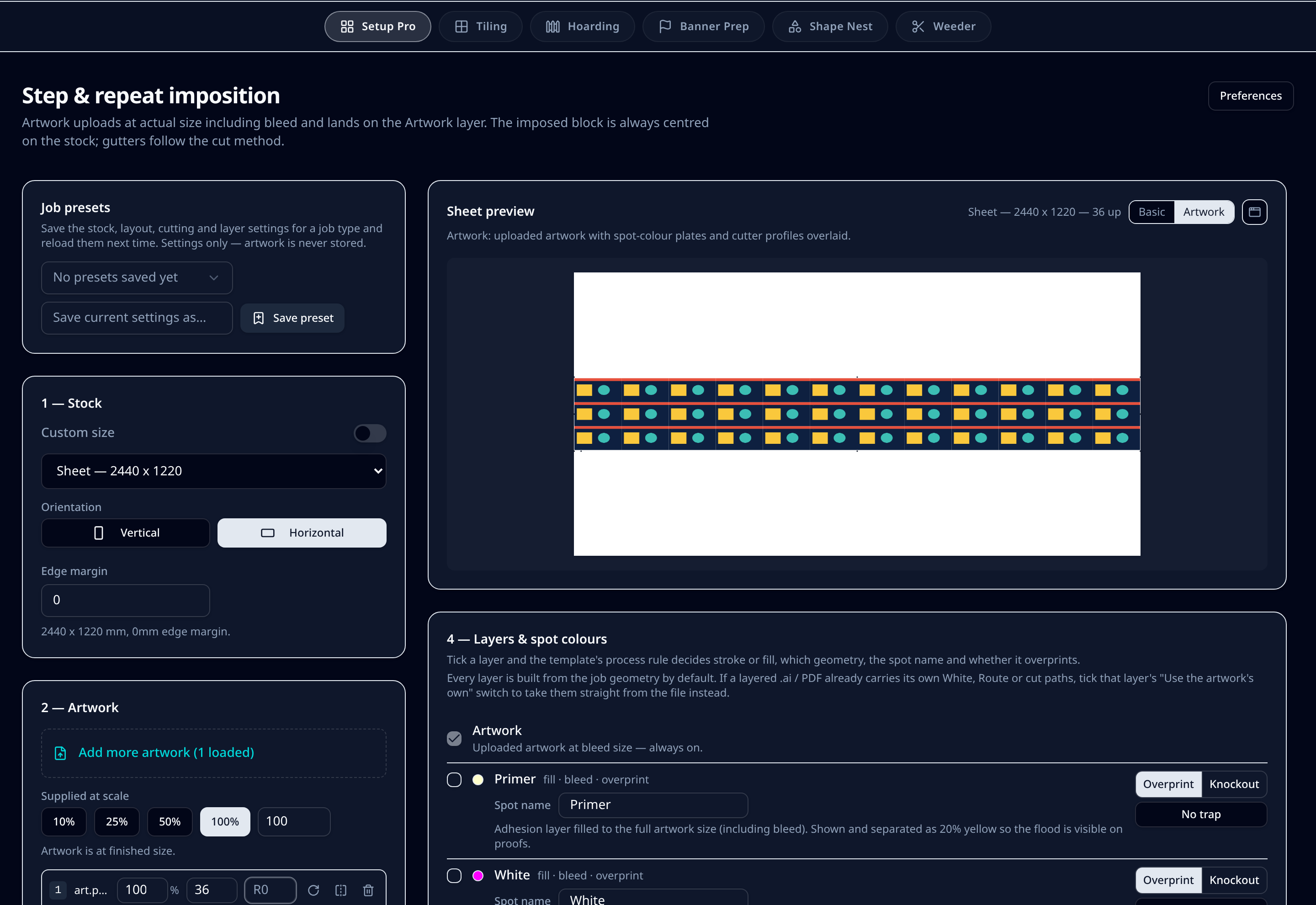
Step-and-repeat, true-shape nesting and ganged runs centred on your sheet or roll with cut-method gutters and bleed overhang.
Learn moreLayered cut files
Thru-cut, kiss-cut, crease, drill and route on separate layers in a native .ai file, so ZCC and other cutters read each tool cleanly.
Learn moreNamed spot plates
White, varnish, primer and custom spots at artwork size with overprint, knockout, choke and editable names — every layer and spot ships with a default you can rename in Preferences.
Learn moreBuilt for production speed
Preflight on upload, job presets for repeat work, and exports that go straight to RIP and cutter — no Illustrator or InDesign open.
Learn moreAmend without re-ripping
Re-impose, re-nest or add a spot plate in seconds before the file ever reaches the RIP. No waiting for multi-gigabyte files to re-rip just to move a cut line.
Learn moreSix modules, one production workflow
Each module is a stage of the prepress workflow, so you can move from artwork to press-ready files without switching between apps.
Setup Pro
Imposition, step and repeat, ganged runs and spot-colour plates for large-format sheets and rolls.
Explore SetupShape Nest
True-shape nesting for cut letters and shapes with bit-driven gutters and holding tabs.
Explore ShapeHoarding
Long site hoarding runs split into butted full-sheet and bespoke cut panels with register marks.
Explore HoardingWall Graphics & Tiling
Oversized wall graphics and billboards split into printable tiles with overlap and assembly markers.
Explore WallBanner Prep
PVC banners with hem-driven cut profiles, pole pockets, eyelets and 6mm register dots.
Explore BannerPSD Weeder
Weeding lines that follow cut contours and stop at the right points for vinyl and print-and-cut work.
Explore PSDWhy browser-based prepress software?
- Works on Mac, Windows or Chromebook — no installs, no version drift.
- Artwork stays in your browser; only preferences and presets reach our servers.
- Job presets store repeat settings so your team follows the same rules every time.
- Exports are PDF/X and native Illustrator .ai with named spot colours and separate cut layers.
Ready for RIP and cutter
The print PDF carries your chosen colour profile and spot plates. The .ai cutter file keeps each cut method on its own layer, so Zünd, Mimaki, Summa and other cutters import the job without merged paths.
Amend before the RIP, not after
Re-ripping a large-format job just to change a sheet size, add a spot plate, or move a cut contour can take minutes — sometimes hours — on jobs with many high-resolution files. PSD Pro Suite handles the layout, layers, bleed and cut profiles before anything reaches the RIP.
- Change imposition, nesting or tiling in seconds and re-export.
- Add, remove or rename spot plates without touching the source artwork.
- Keep your RIP queue clear for new files instead of reprocessing amendments.
Prepress-first workflow
Customer artwork → layout, spots, cut layers → print PDF + cutter .ai → RIP. The RIP receives a press-ready file that already contains everything it needs, so amendments happen upstream where they are fast.
Questions about print production software
What is print production software?
Print production software turns customer artwork into the files a printer needs: imposed layouts, spot-colour separations, cut contours and proofs. PSD Pro Suite does this in the browser for large format, sign and display work.
Can it replace my prepress workflow in Illustrator?
Yes for the repetitive parts. Upload artwork, set the sheet or roll, choose the cut method and layers, then download the print PDF and layered .ai cutter file. You can still open the .ai in Illustrator if a job needs manual finishing.
Is this prepress software or RIP software?
PSD Pro Suite is prepress software: it prepares the file before your RIP. It does not drive the printer directly or replace a RIP, but it writes print-ready PDFs and cutter files that most RIPs and flatbed cutters accept.
Do I have to rip the file first to make amendments?
No. One of the biggest delays in large format is re-ripping a job just to move a cut line, add a spot plate, or change a sheet size. PSD Pro Suite lets you amend the layout, layers, bleed and cut profile in seconds, then export a fresh print PDF and cutter file. The RIP only sees the final, approved version, so your RIP queue stays clear for new work.
Do I install anything?
No. It runs in a web browser. Files are processed locally — only your account preferences and presets are saved to our servers.
Who is it for?
Large format printers, sign shops, display printers, exhibition printers and trade printers who need fast, repeatable imposition, nesting, tiling and cut-file preparation.
Try the prepress software built for large format
Request a 7-day access code and see how much manual setup time you can save on imposition, nesting, tiling and cut-file preparation.